

December’s updates strengthen control and transparency across invoicing, approvals, and organisational management.
Key updates include new Super Approver permissions for invoices and credit notes, expanded tracing information for Invoices and Credit Notes, clearer Budget warnings in Requisitions, improved Paperless Invoice handling, and improved Organisation and Supplier management tools.
Read on to learn about the new features that you can use in PurchasePlus.

Back to All Product Updates
December 2025 Monthly Wrap-Up
Product Update
Published January 7th, 2026

Welcome
Jump To
Invoice 'Super Approver' Permission
There is now a new 'Can Super Approve Invoices And Credit Notes' permission available for Purchaser Users, which is Off by default. When granted to a user, it enables two functions:
- Forcefully transitioning any 'Awaiting Approval' Invoice or Credit Note into the 'Reconciled' state, and
- Editing the details (except the Department and Invoice Lines) of an Invoice or Credit Note when it is in the Reconciled state.
The Super Approve action is found in the [More] menu of the Invoice or Credit Note header when in the 'Awaiting Approval' state:
- Forcefully transitioning any 'Awaiting Approval' Invoice or Credit Note into the 'Reconciled' state, and
- Editing the details (except the Department and Invoice Lines) of an Invoice or Credit Note when it is in the Reconciled state.
The Super Approve action is found in the [More] menu of the Invoice or Credit Note header when in the 'Awaiting Approval' state:
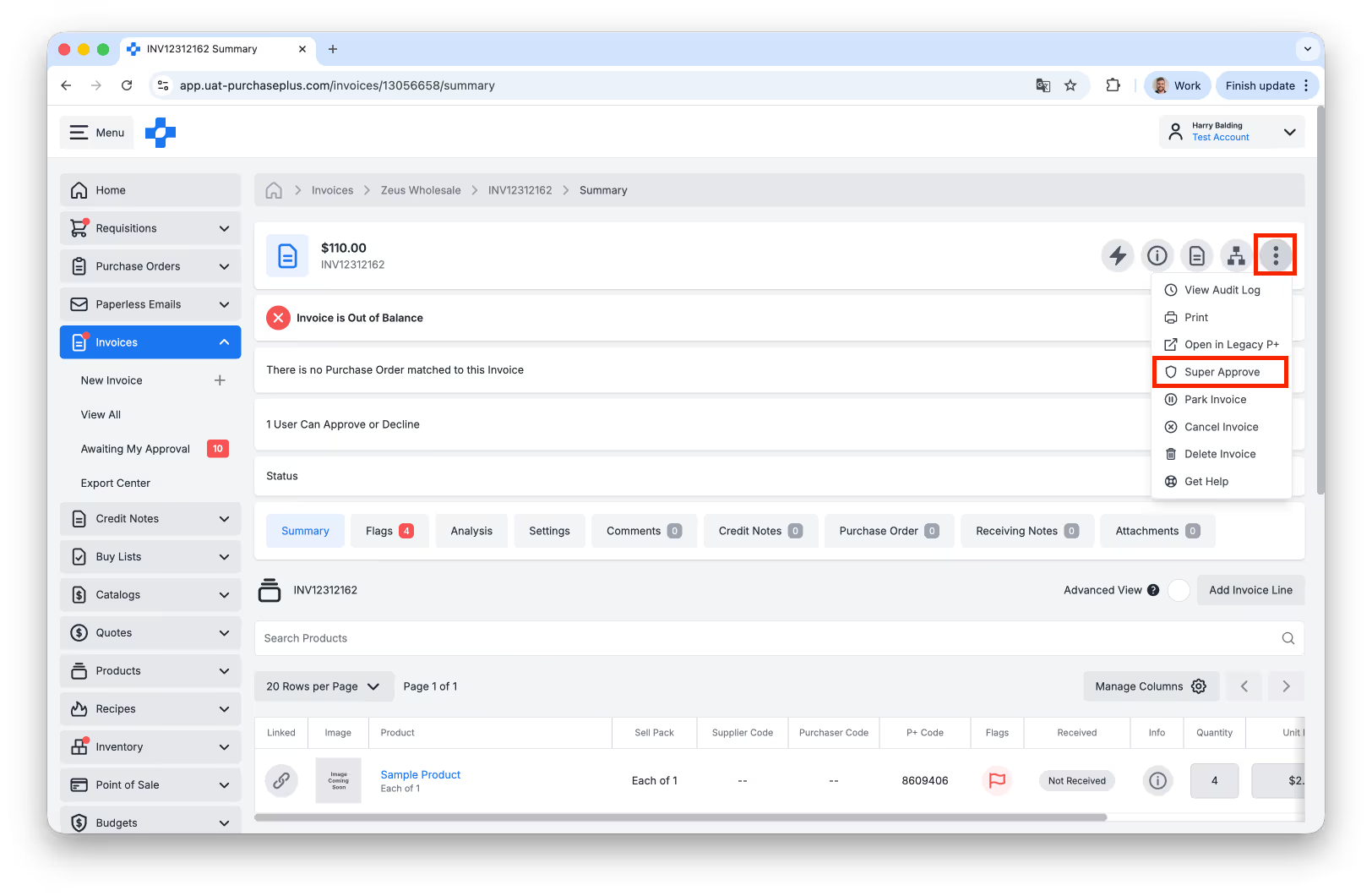
Above: Super Approvers can forcefully transition an Invoice from 'Awaiting Approval' to 'Reconciled'.
Enhanced Invoice and Credit Note Traceability
The following new fields are available in the Info Panel of an Invoice or Credit Note:
- Paperless Email,
- Process Document,
- Scanning Task,
- Created By.
- Paperless Email,
- Process Document,
- Scanning Task,
- Created By.
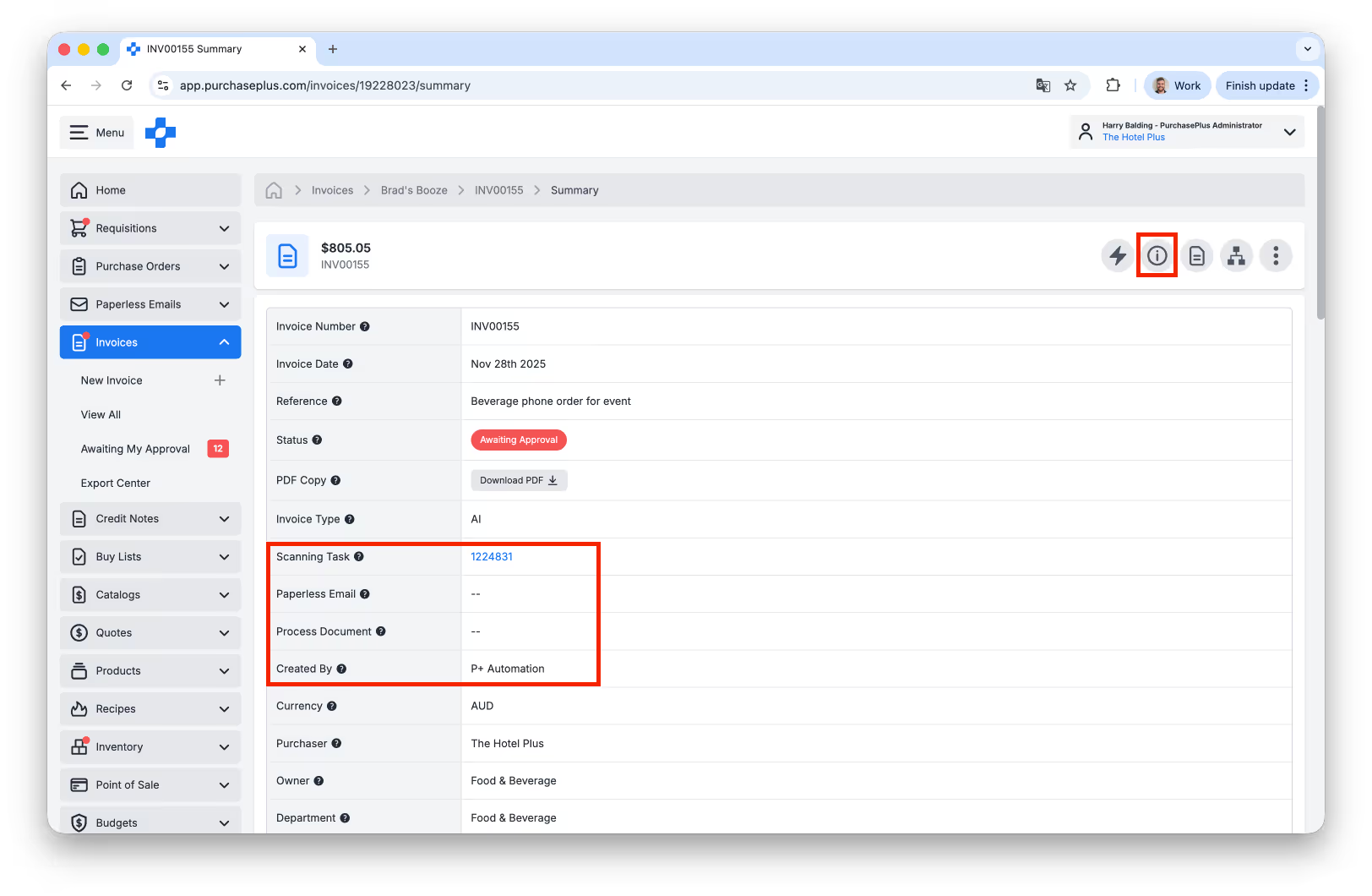
Above: New fields available in the Invoice or Credit Note Info Panel.
Assign an Invoice or Credit Note Approval Workflow to an Organisation or Department
You can now assign an Invoice or Credit Note Approval Workflow to an Organisation Unit in the Assignments tab of the Workflow:
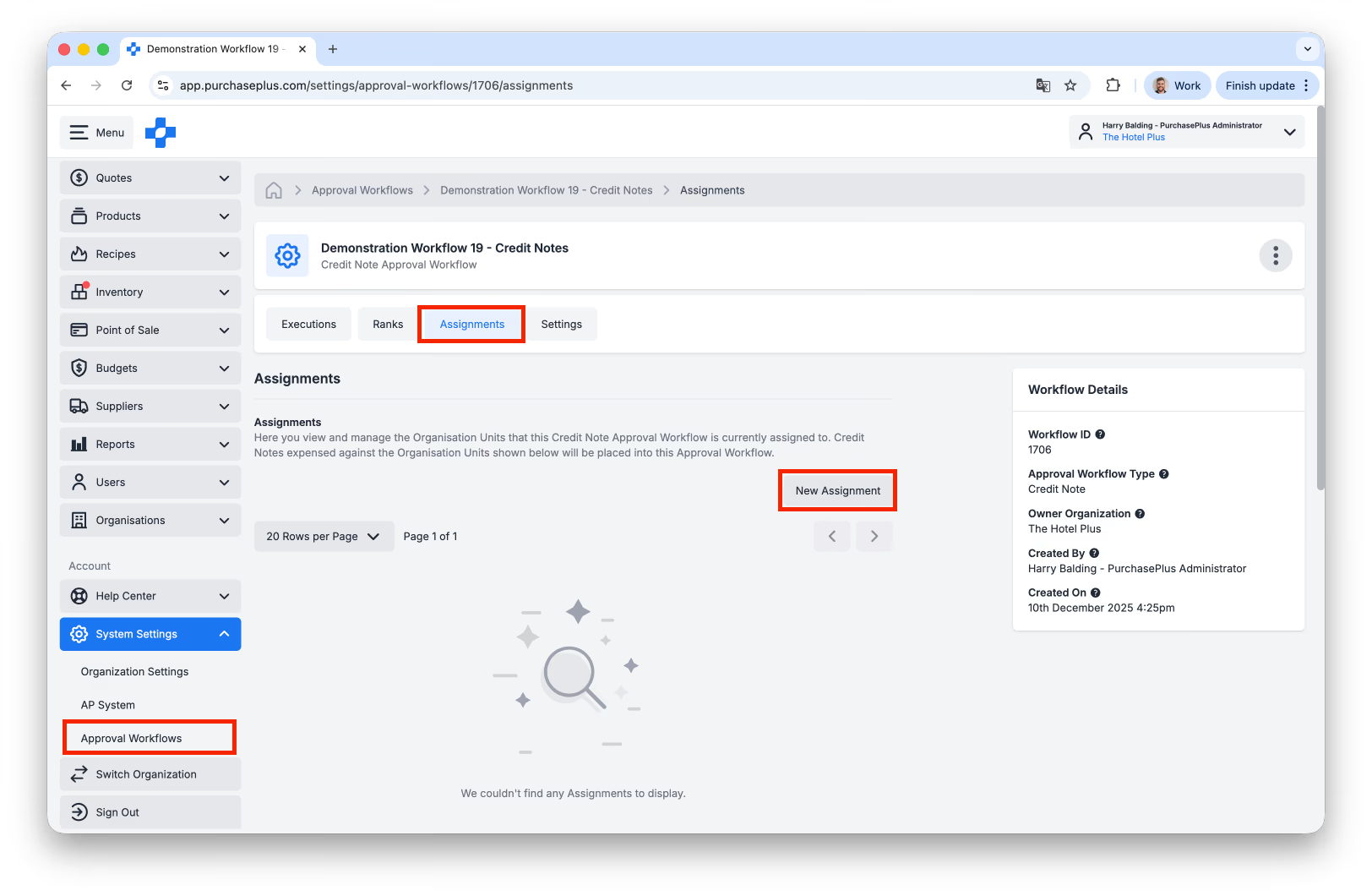
Above: Assigning a Workflow to an Organisation unit.
Budget Warnings in Purchase Requisitions
There is now a Budget warning in the header of an Open or Awaiting Approval Requisition, if:
a) there is a Budget applied to the Department/Account Code raising the Requisition, and
b) the Actual Budget is (or will be exceeded) by Approving this Requisition.
Additionally, there is now a Budget field in the Info Panel of a Requisition if the Budgets feature has been enabled for the Organisation.
a) there is a Budget applied to the Department/Account Code raising the Requisition, and
b) the Actual Budget is (or will be exceeded) by Approving this Requisition.
Additionally, there is now a Budget field in the Info Panel of a Requisition if the Budgets feature has been enabled for the Organisation.
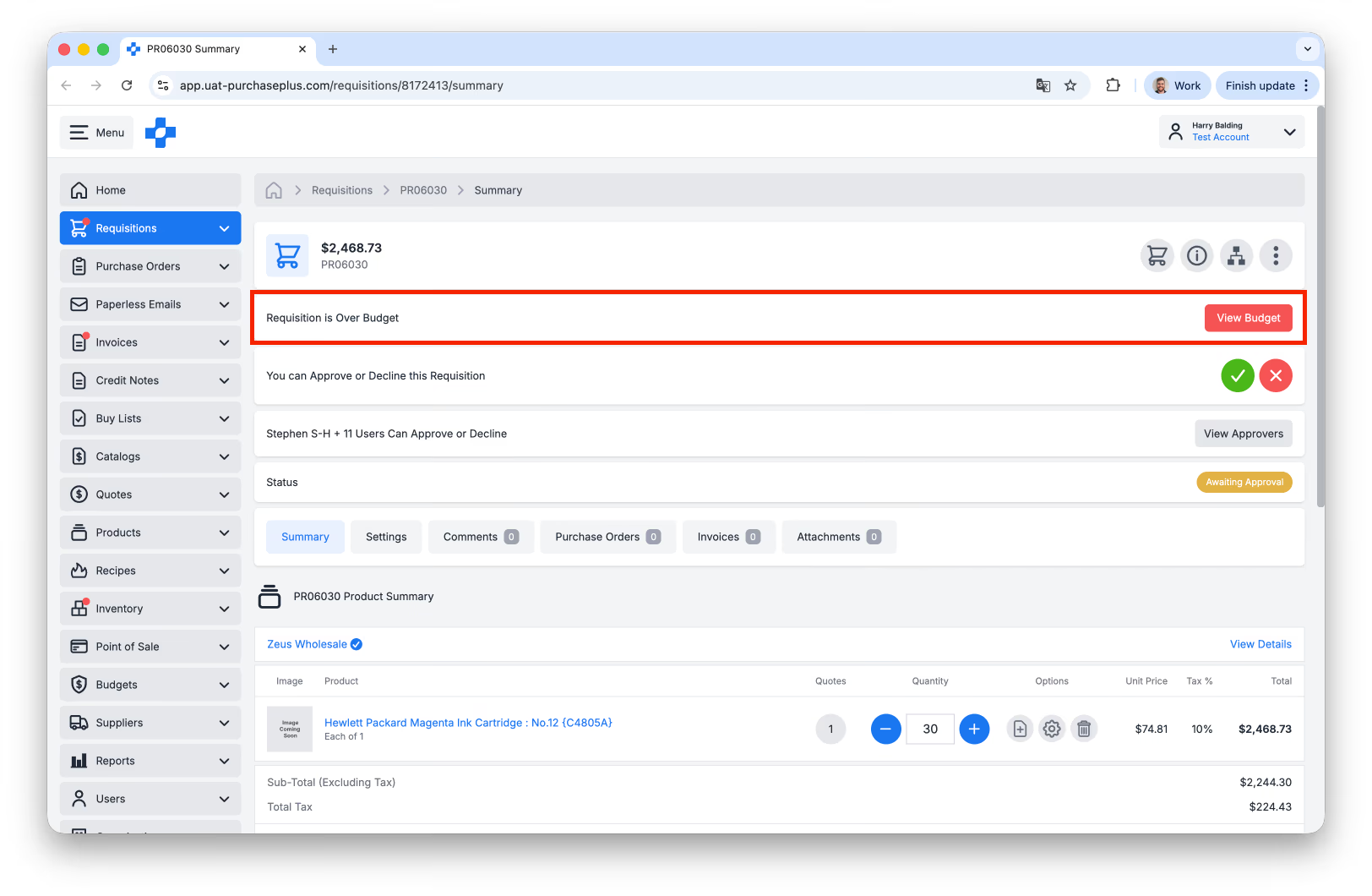
Above: Budget Warnings will appear for Approvers to review before Approving a Requisition.
New Organisational Management Tools
There is a new [Organisations] Side-Nav area for Purchasers to view a list of their Organisations, including the Organisation they are currently signed in to and any Organisation below that in the hierarchy.
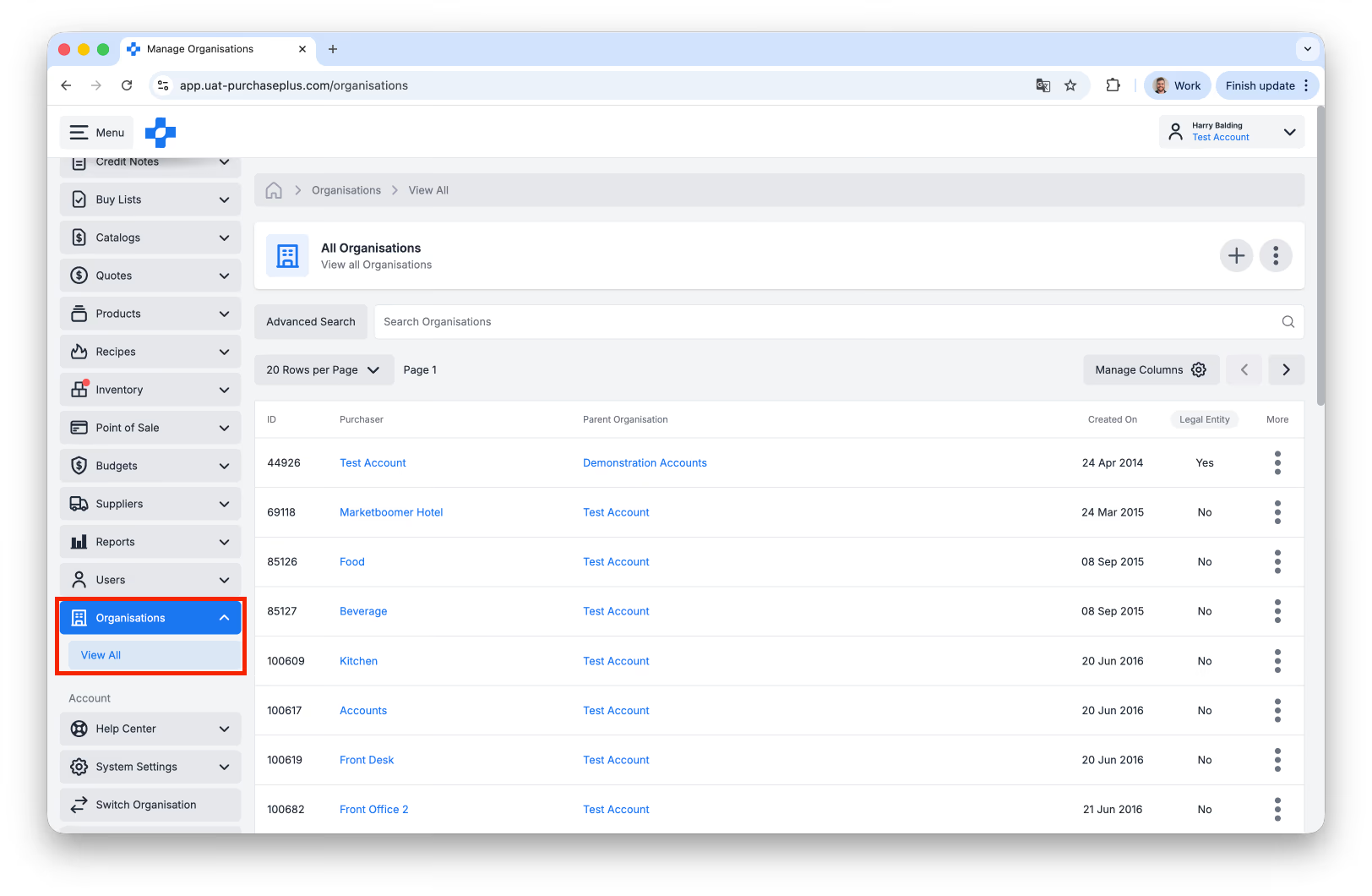
Above: Viewing a list of your Organisations.
Additionally:
- Purchaser users can now create a new Non-Legal Entity Organisation (i.e., a Department, rather than a Purchaser Organisation) in the Organisations area, and
- You can now set the Default Account Code on an a Purchaser Organisation in the General Tab of Organisation Settings:
- Purchaser users can now create a new Non-Legal Entity Organisation (i.e., a Department, rather than a Purchaser Organisation) in the Organisations area, and
- You can now set the Default Account Code on an a Purchaser Organisation in the General Tab of Organisation Settings:
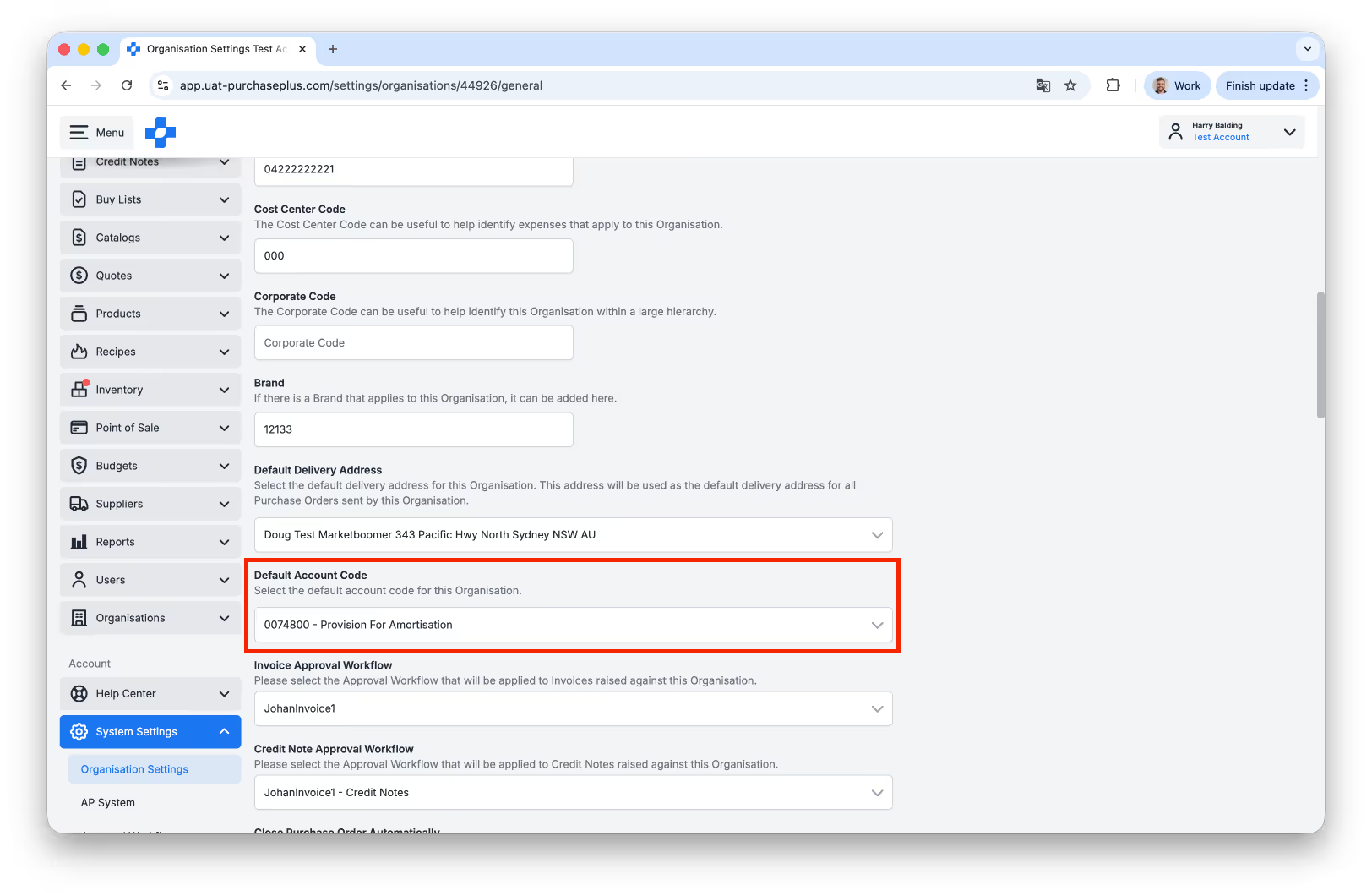
Above: Setting the default Account code for an Organisation.
New Supplier Management Tools
Purchaser users can now:
- Create a new Destination on a Supplier that they own and manage.
- Create a new Delivery Fee in the Delivery Fees tab when viewing a Supplier that they own and manage.
- Set the Delivery Fee in the General tab when viewing a Supplier that they own and manage:
- Create a new Destination on a Supplier that they own and manage.
- Create a new Delivery Fee in the Delivery Fees tab when viewing a Supplier that they own and manage.
- Set the Delivery Fee in the General tab when viewing a Supplier that they own and manage:
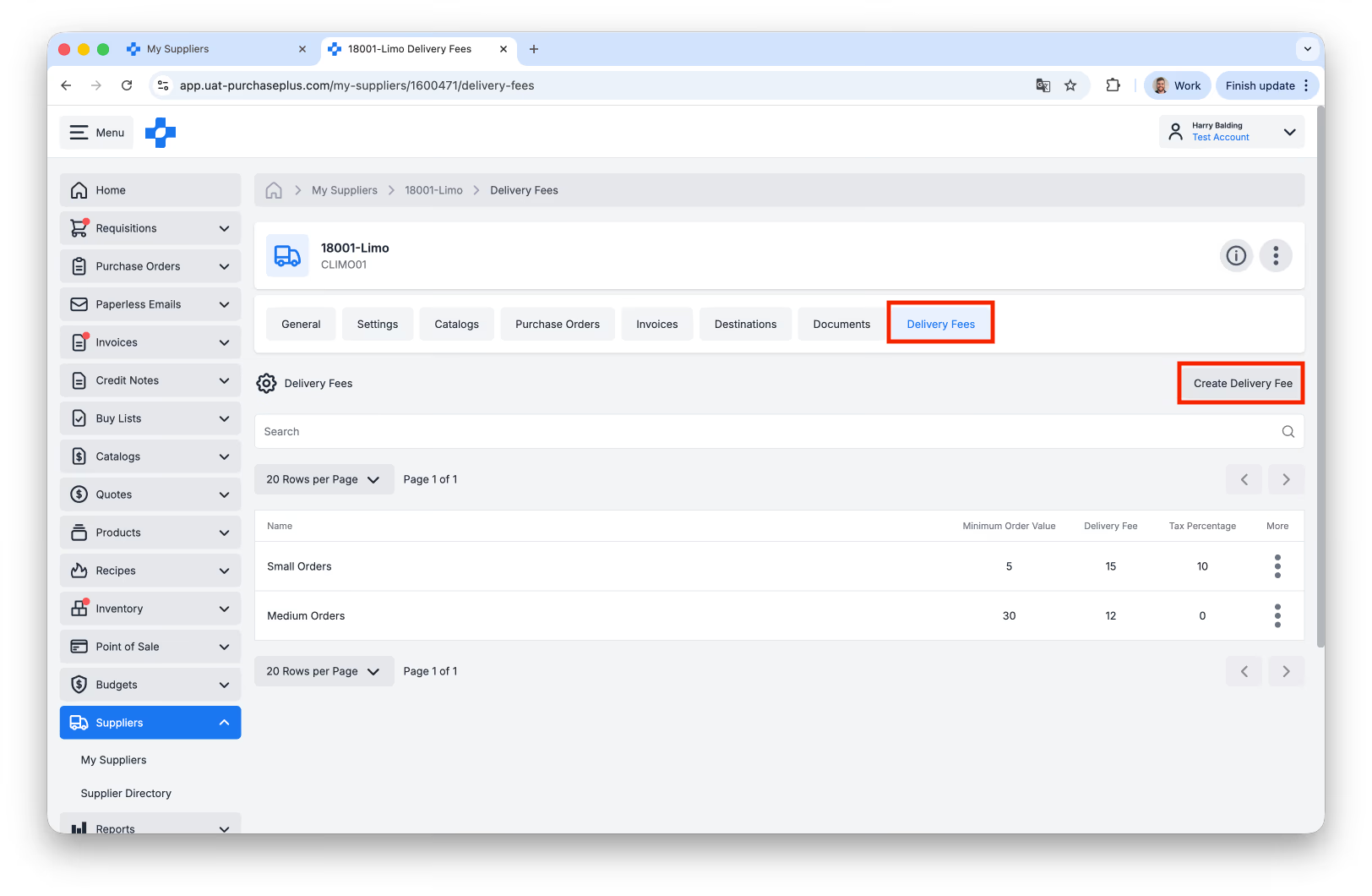
Above: Self Managed Supplier Delivery Fees.
Aged Invoice Search Filter
There is a new age-based Advanced Search filter in the All Invoices view for Invoices 30 Days, 60 Days and 90 Days old:
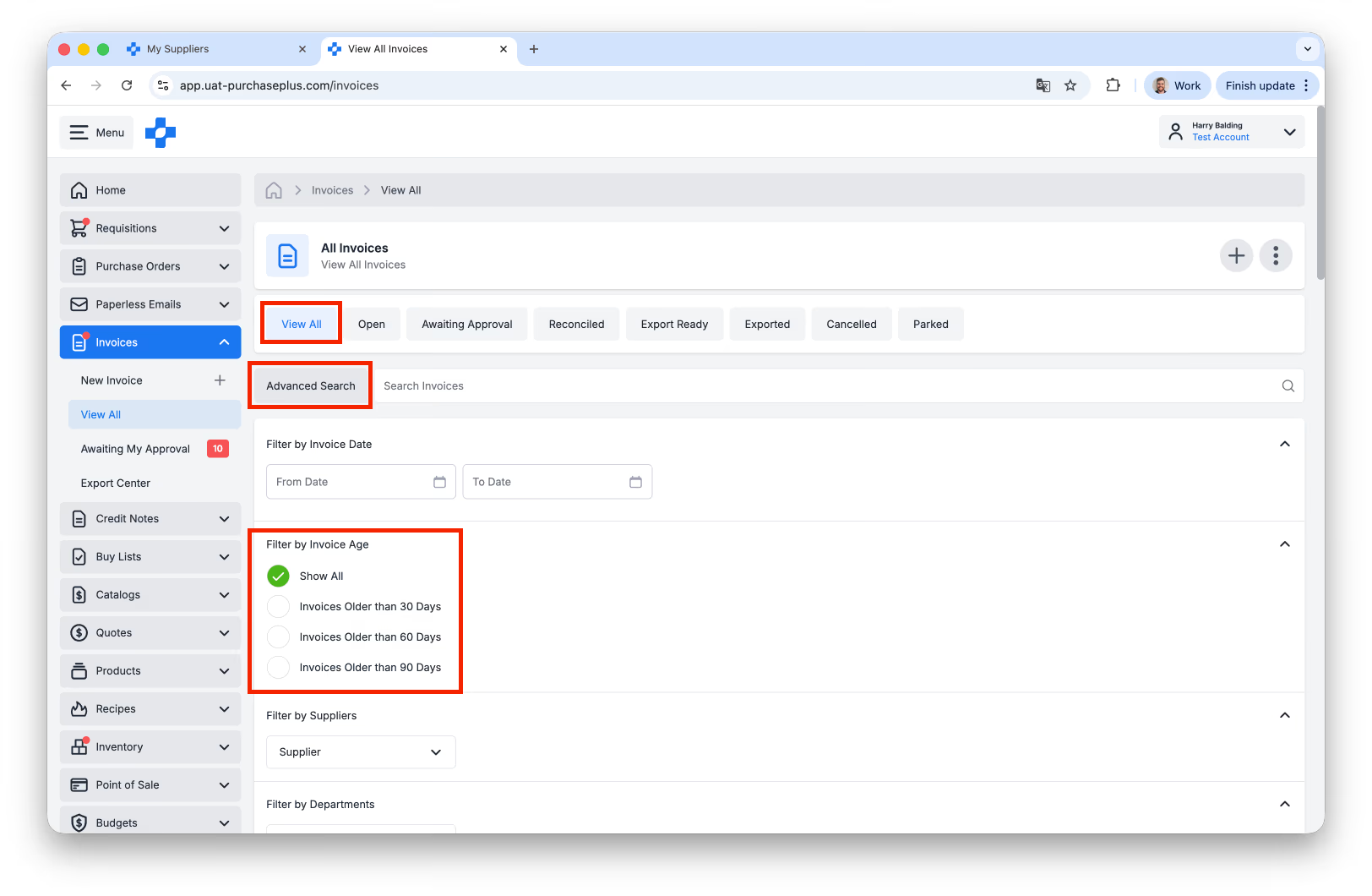
Above: Age-based Advance Search Filtering for Invoices.
Receiving Note Enhancements
- The Total Value of a Receiving Note is now displayed in the Header of the Receiving Note.
- You can now view cancelled Receiving Notes by selecting the [Cancelled] tab on the Receiving Notes page:
- You can now view cancelled Receiving Notes by selecting the [Cancelled] tab on the Receiving Notes page:
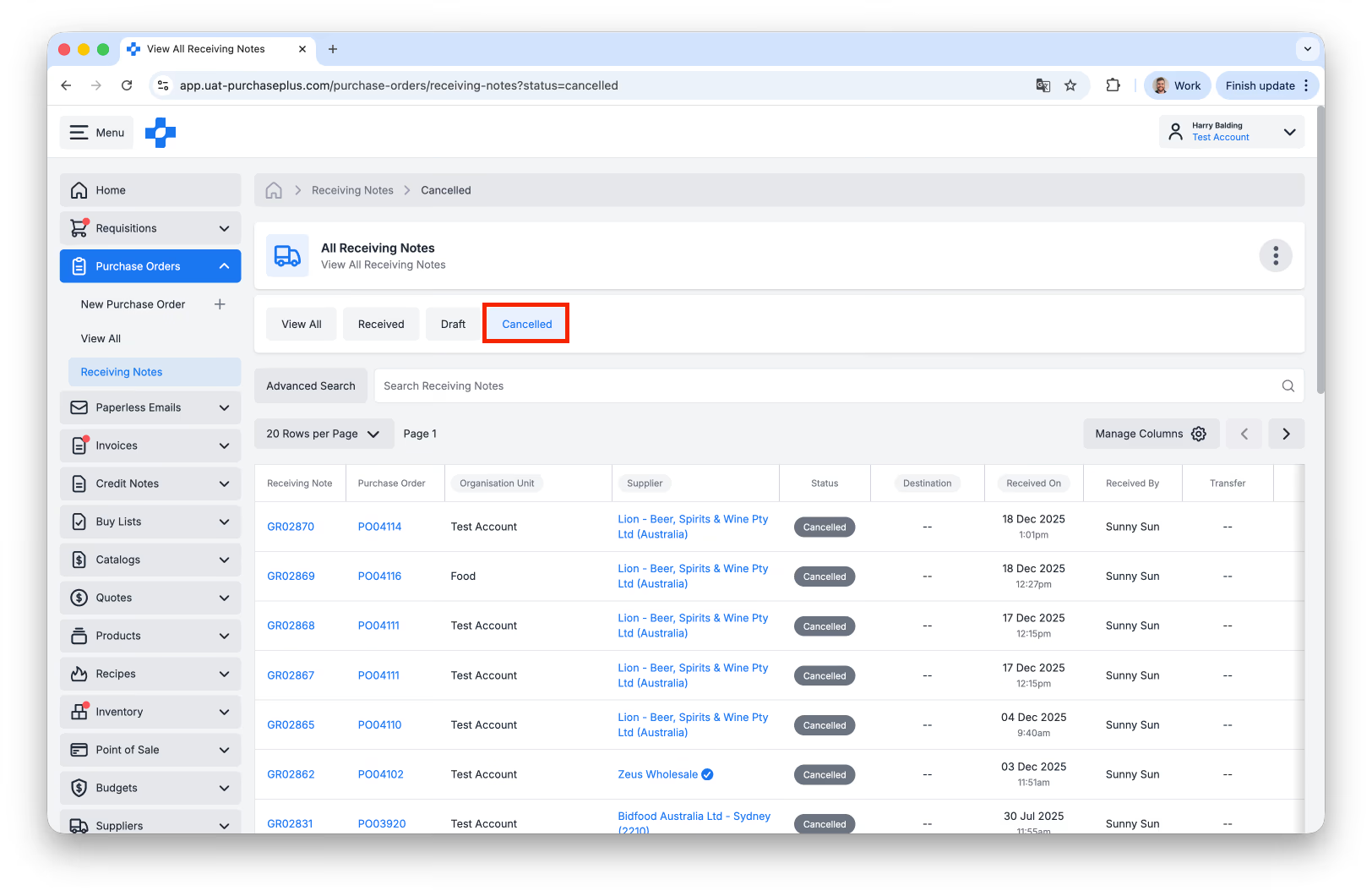
Above: Viewing Cancelled Receiving Notes.
Paperless Invoicing Enhancements
There are now auto-replies sent by our Paperless Invoicing service when:
- No Purchaser was found (based on the TO: address), and
- One of the Process Documents was found to be a duplicate Invoice or Credit Note.
Additionally, deleting an existing Invoice or Credit Note will now clear the duplicate check data, and allow the user to resend the invoice via email if they like.
- No Purchaser was found (based on the TO: address), and
- One of the Process Documents was found to be a duplicate Invoice or Credit Note.
Additionally, deleting an existing Invoice or Credit Note will now clear the duplicate check data, and allow the user to resend the invoice via email if they like.
Other Enhancements
- We have added the Created On field to the Info Panel of a Goods Receiving Note, Invoice, Credit Note, Stock Location, POS Item, POS Outlet, POS Batch Sale for additional traceability.
- You can now change the rows per page to 50 or 100 on the All Users table view.
- Offline mode for a Stocktake is now available again.
- When previewing the Stock Locations modal showing where a Stock Item is held, System Locations are also shown for convenience:
- You can now change the rows per page to 50 or 100 on the All Users table view.
- Offline mode for a Stocktake is now available again.
- When previewing the Stock Locations modal showing where a Stock Item is held, System Locations are also shown for convenience:
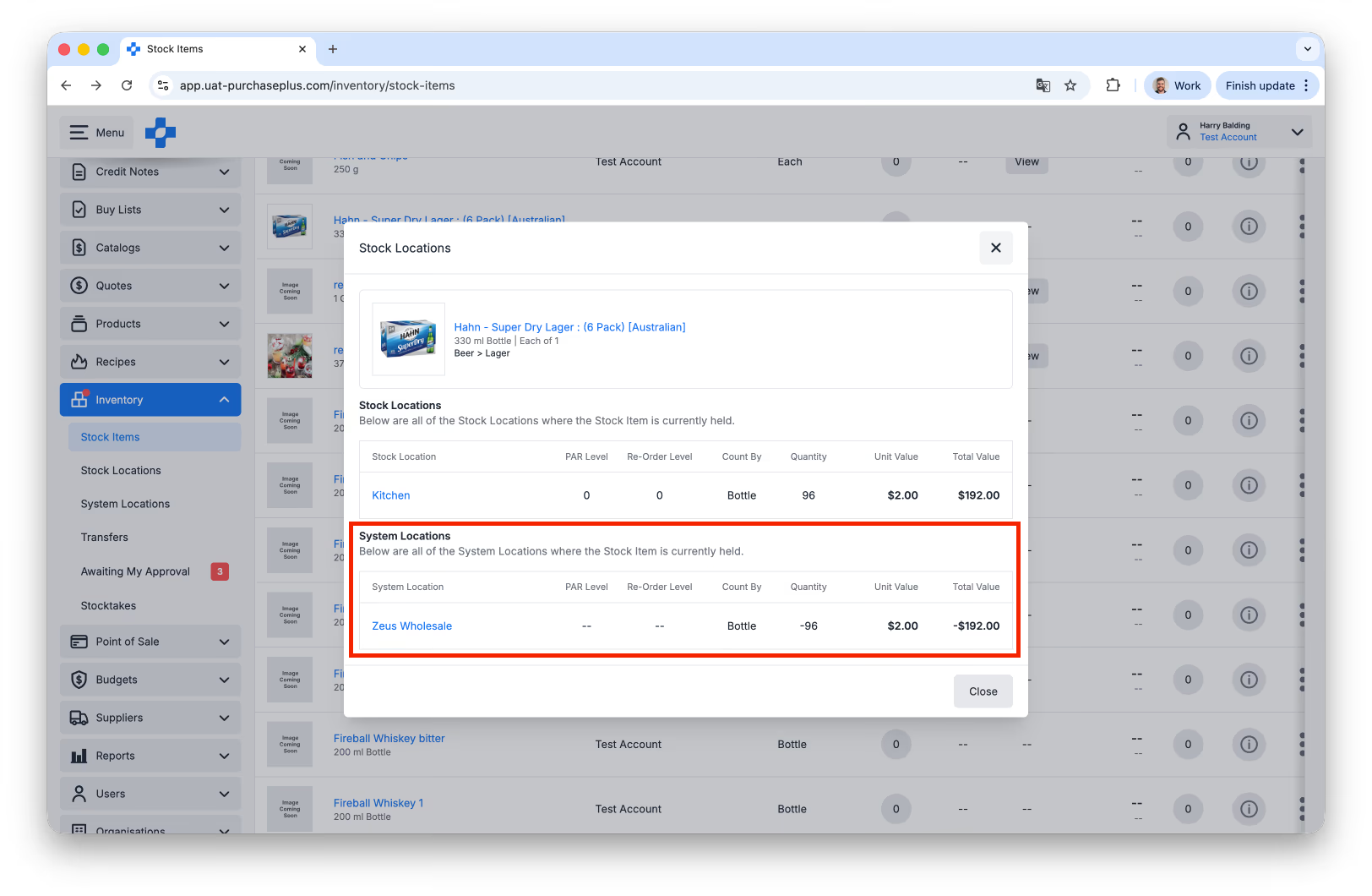
Above: Previewing Stock and System Locations where a Stock Item is held.
For any questions, please contact us via email on help@purchaseplus.com or phone us on +61 2 8215 7133.