Statement Statuses
Statement Statuses
Line Statuses
A Statement line can have one of four states. The status comes from the matched invoices and the force-reconciled flag and updates automatically when the underlying invoices change.
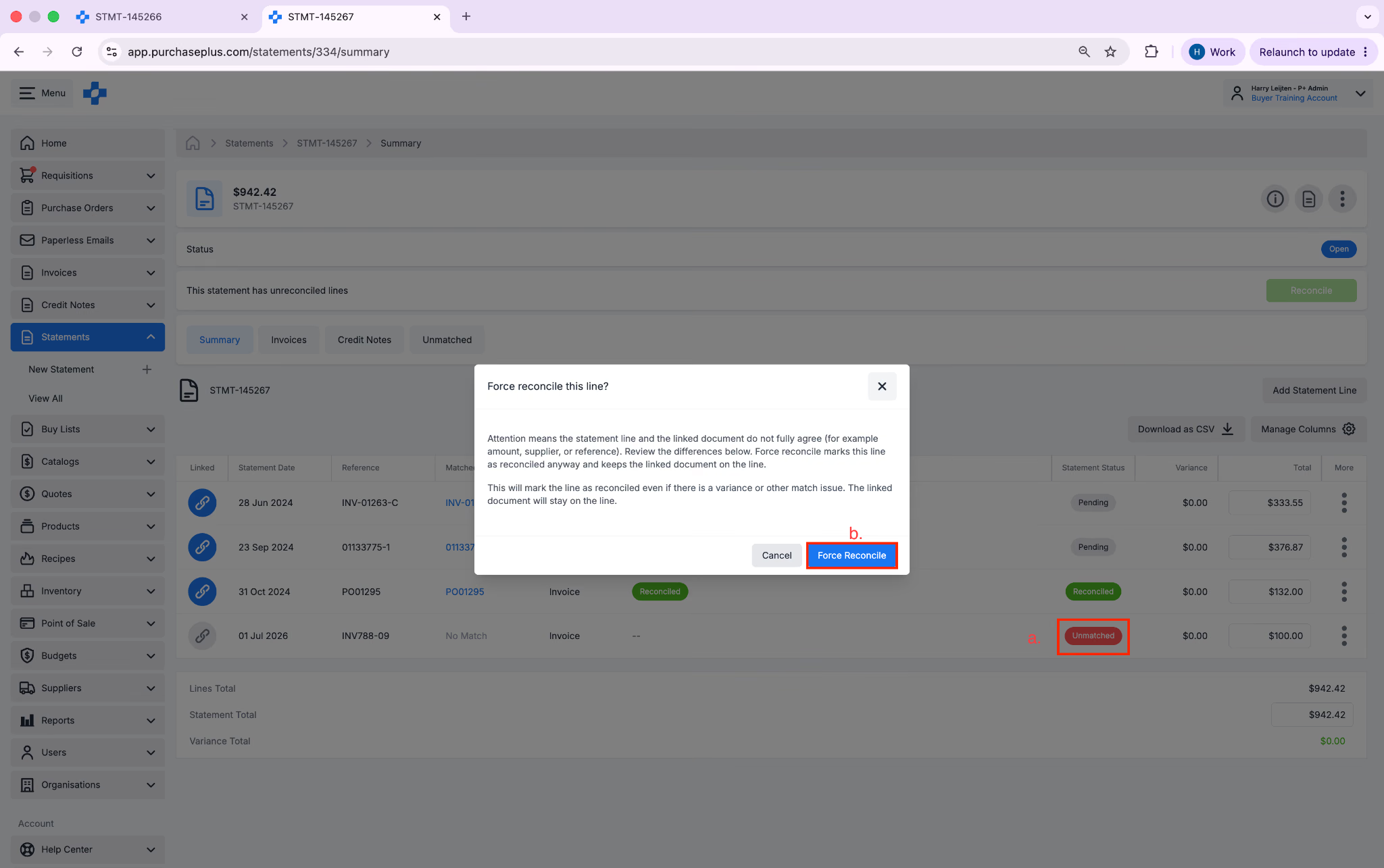
- Unmatched: No invoice match has been found. May still match a future invoice; you can also link one manually or force reconcile.
- Pending: An invoice has been matched, totals agree, but the invoice is not yet final (still Open, Approved, or Exported). It will move to Reconciled automatically when the invoice is Paid or Processed.
- Attention: An invoice has been matched and is final, but at least one Attention reason applies. You need to look at it.
- Reconciled: Matched, final, totals within tolerance, and no Attention reasons. Or, the line has been Force Reconciled.
Attention reasons
When a line is in Attention, it carries one or more reasons. A line can carry multiple reasons at once and they are all surfaced.
- Variance: The amount on the statement and the invoice total differ by more than your tolerance.
- Wrong Supplier: The matched invoice belongs to a different supplier than the statement.
- Duplicate: The matched invoice is also linked to a line on another statement.
- Cancelled: The invoice or Credit Note has been cancelled
Note: Tolerance is the rule for accepting small variances automatically. It uses the same threshold configuration you already have for Invoices and Credit Notes.
Working through exceptions
A line is Unmatched
If you have an unmatched line in your statement you can:
- Wait: if the invoice has not been received yet, leave the line as Unmatched. New invoices arriving in PurchasePlus will be picked up next time you open the detail view or click Run Matching.
- Search and Link: open the manual search modal to find and link the invoice yourself (see below).
- Force Reconcile: if you know the line will never have a matching invoice (for example, a cash payment, an off-platform settlement, or a one-off charge), force reconcile it with a reason.
Force reconcile
Force reconcile is the Line override. The line displays as Reconciled with a "Forced" indicator.
You can Force Reconcile any non-Reconciled line: Unmatched, Pending, or Attention.
Use it when:
- An Unmatched line will never have a matching invoice (off-platform settlement, balance forward, irreconcilable item).
- A Pending line should be closed without waiting for the invoice to reach final state.
- An Attention line carries a reason you have reviewed and accepted (variance, cancelled invoice, etc.).
How to Force Reconcile
- Click the Statement Status
b.Click [Force Reconcile.]